Screen printing, DTF, UV DTF and laser cut transfers to personalise your garments and objects!



Prepare your PrintMyTransfer printing files
An optimal file for printing your transfers
Download our free templates
To make your file creation easier for your transfers into amalgam sheets, we provide you with our PDF templates, which can be used notably in Illustrator and Photoshop.
These templates help you creating your files and allow you to optimise your printing area.
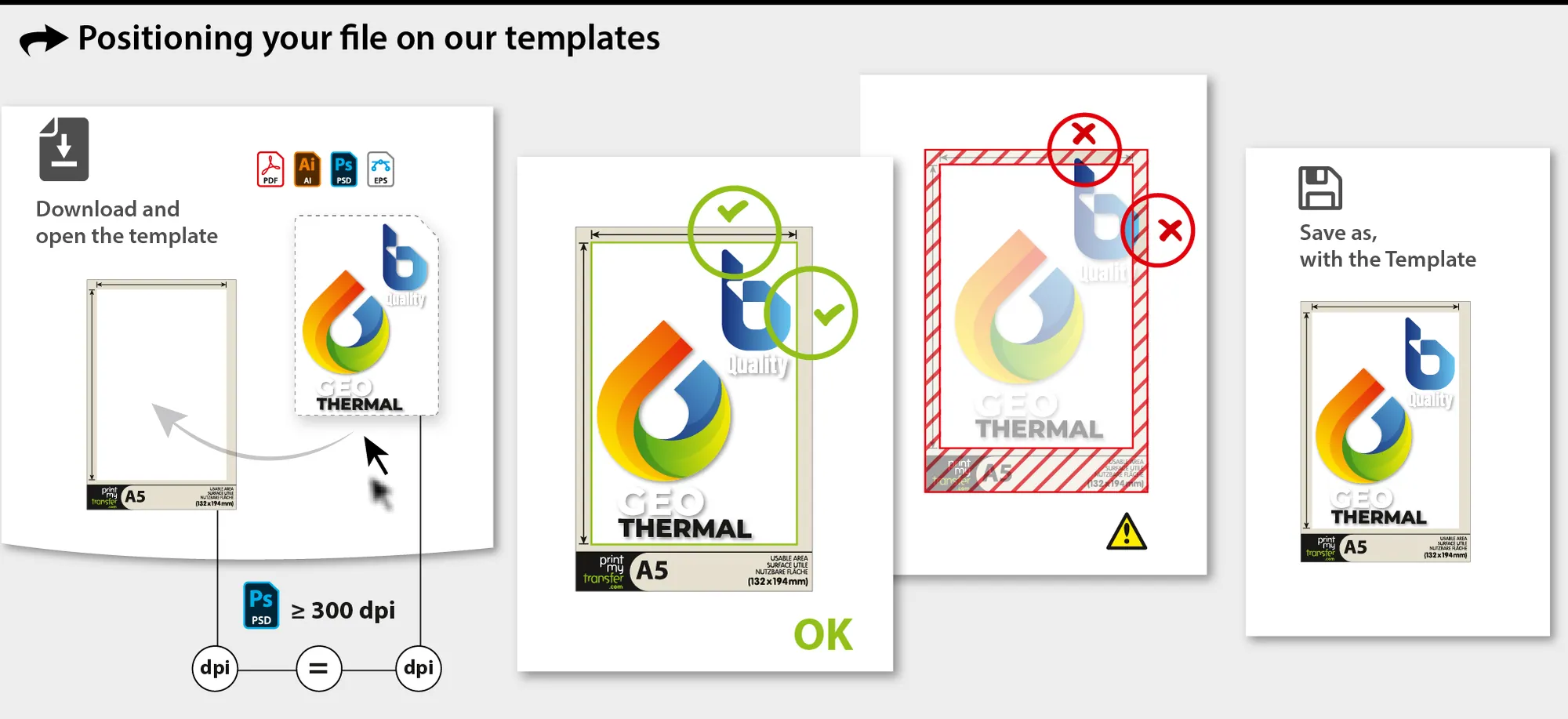
Warning! Your images must absolutely be at 1:1 scale, i.e. 100%.
Templates for SeriQuadri, SeriWhite, SeriLight, SubliStop
A8


A7
A6
A5
A4
A3
A2
(SeriQuadri / SeriLight only)
Templates for SeriOne (Format+)
A8+
A7+
A6+
A5+
A4+
A3+
A2+
Templates for SeriFlock
Template: DTF, UV DTF
A6
A5
A4
A3
A2
A2 - Cutting option (DTF)
575 x 1000 mm
Templates for weeding board (Laser Cut)
Creating your files with PrintMyTransfer templates:
- Open the template with a suitable software and save the file under the name of your choice
- Keep the template on its own layer and lock it
- Use images at a minimum of 300 dpi or vectorised elements for composing your files
- Start building your design on one or more layers other than the template layer
- Create your layout with the different elements that will compose your sheet.
No element must touch the beige border - The file must be worked in the normal reading direction (no "mirror" effect)
SeriOne technical note: SeriOne thin lines and blank areas must be at least 0.8 pt (0.3 mm), i.e. 4 pixels at 300 dpi.
SeriQuadri / SubliStop technical notes: Due to the different layers composing our SeriQuadri and SubliStop transfers and registration constraints, the outer borders of your artwork must be at least 1.5 pts. These values ensure that the transfer result will meet your expectations.
Tip
To save money, choose the template closest to the size of your file! Don’t waste time making A3 combined sheets.
How to submit your files in the right format?
You must submit compliant files directly in the "My images" section of your PrintMyTransfer personal space.
Optimal format:
- The optimal file format is vectorised PDF, or digital at 300 dpi, non-flattened.
- Our software also accepts other vector formats (with vectorised fonts), or digital formats (minimum native resolution of 300 dpi, non-flattened) such as .ai, .eps or .psd.
- The image must not contain a colour or white background, unless you wish to print it as well.
- The image must be in the correct reading direction.
- From a colorimetric point of view, it is preferable to work on a CMYK file.
Colorimetric management of your file
PrintMyTransfer uses the ISO Coated v2 300% colorimetric space (CMYK profile). If your file has a different colorimetric space, it will be automatically converted. This can cause a real difference in the final colour of your transfers.
It is therefore preferable to work on a CMYK file, specifically dedicated to CMYK printing.
ISO Coated v2 300% is a standard profile commonly used in classical printing. We strongly recommend assigning it to your files to ensure colorimetric consistency between your file, our printing process and your transfers.
SeriQuadri technical note: In SeriQuadri multicolour, you must check that white areas and texts do not contain residual CMYK values.
Deep black: If you want a dense black, it is advisable to enrich your CMYK black using CMYK inks with values C100%, M100%, Y100%, K100%.
Warning – Pantone shades
Often used in graphic guidelines, Pantone shades require some precautions. It is advisable to first assign the CMYK profile ISO Coated v2 300% to your file and then choose your colours from the Pantone swatch in your software. Ideally, use the ColorBridge Coated swatch to visualise the shade conversion. Avoid using Pantone spot colours, as this may cause problems due to their non-CMYK status when printing transfers.
Please note that Pantone hues cover a wider colorimetric space than CMYK. Some shades, particularly very vivid ones, cannot be reproduced identically, but as closely as possible.
If you have specific colorimetric requirements, do not hesitate to contact our sales department to adapt our process to your expectations.
Pantone ColorBridge Coated:
Our "File checking" option (flat fee €9)
File checking is a flat-rate option offered when you order, before you finalise it.
Our graphic designers do not modify your file: they check it before printing.
They check the following 4 points:
- Sharpness and thickness of contours
- Thin lines
- The presence of a background or template
- Shadows and gradients
Need a correction? Our graphic designers can retouch your file with our paid graphic design services (background removal, thin line adjustment, outline enhancement…). They cannot improve the quality of a poor original file and do not include any design creation.
Our online simulation and correction tool
Our innovative interface allows you to check your file compliance and generates the final rendering of your transfer applied on the fabric colour you have selected.
You can therefore check your files independently before definitively validating the result and the order.
Depending on the artwork and technique chosen, our software will show the printing result and offer to apply (or not) corrections.
If you wish to work with combined sheets, you must choose a printing format with dimensions larger than your original file and repeat the elements as many times as necessary.
Our online tool will then propose you to "cut" your file by zones and choose fabric colours for each artwork.
When you have completed this validation process, you will be able to download the final rendering before your order. Only this document, accepted by you, is valid. No further checking will be carried out by our team.
Need help? Discover our tutorials and our FAQ.